





Act on five hundred clients as easily as one.
Slice your entire book by status, policy, state, or agent — preview exactly what will change — then update, assign, and route in bulk with a full audit trail.
Slice the whole book
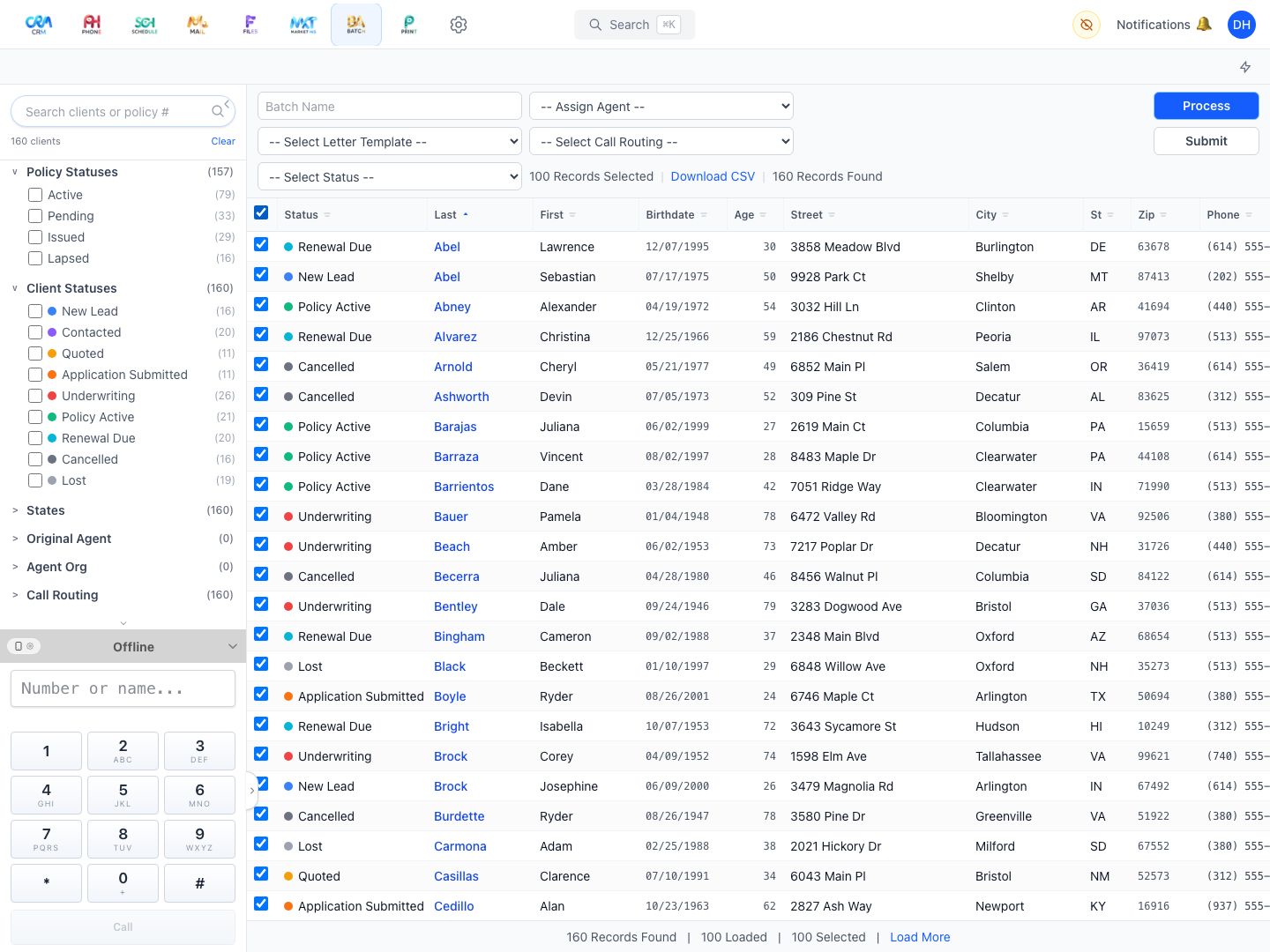
Filter by client status, policy status, state, company, original agent, agent organization, call routing, and assigned user — with search that matches phone digits and policy numbers too.
-
2
Preview, then execute
Workganic checks the whole batch first and shows exactly which clients will be updated — and which will be skipped — before anything changes.
-
3
Bulk operations with guardrails
Assign agents, set statuses, and set call routing across the selection — capped per run, with an extra verification step before anything changes.
-
4
Audited to the client
Every run is saved — what you filtered, what you changed, and how many clients it touched — and each affected client’s history shows exactly which update did it.
-
5
Take it with you
Export the filtered list to a spreadsheet (CSV) anytime, with sortable columns — including each client’s current age.

Batch is included on every plan — not an add-on.
From Starter up, Batch works around the same client record as everything else. See how it fits into your agency’s day — on your own book of business, not a canned demo.